
How Browsers Work: Rendering, Layout, and Painting (Interview Edition)
🚀 For JavaScript developers preparing for frontend interviews — this post is part of a paid series focused on real-world technical questions and concepts.

📋 What You'll Learn in This Post
What happens when you type a URL in the browser
How rendering works under the hood (DOM, CSSOM, render tree)
What triggers reflows and repaints
Most common performance interview questions
Optimized React examples
Real answers you can give in interviews
Soft skills questions & AI usage tips
💬 Why This Post?
Over the past 8 years of interviews — both as a candidate and as an interviewer — I've seen the same core questions repeat again and again:
"What happens when you type a URL?"
"Explain the rendering pipeline."
"What causes layout shifts or reflows?"
And I get it — I used to struggle with these questions too.
But now I want to make it easier for others by sharing everything I’ve learned in a single place. If you’ve ever wished someone would just explain how browsers work in simple, interview-ready terms — this post is for you.
🌐 What Happens When You Type a URL? (Deep Dive)
This question comes up in almost every interview — and it's where many candidates start to stumble because they stop at “it sends a request.”
Here’s a more complete, structured version you can use or adapt:
Step-by-Step Breakdown:
DNS Resolution
The browser checks cache → OS cache → router cache → DNS server to resolve the domain name to an IP address.
You can explain DNS caching layers if asked for details.
TCP Handshake + TLS (if HTTPS)
TCP connection is established (3-way handshake).
If HTTPS, the browser and server negotiate TLS to encrypt communication.
HTTP Request
Typically a
GETrequest is made for the main document.You can mention headers (like cookies, auth, user-agent) if asked.
Server Responds
Returns an HTML document with a
200 OKresponse.
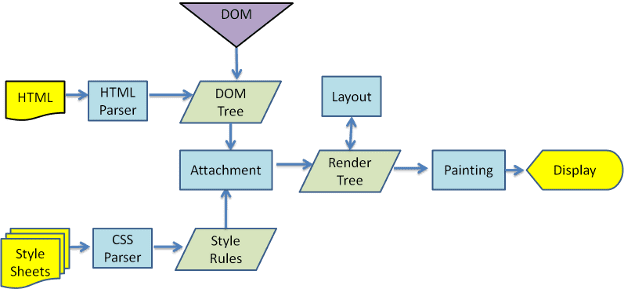
Browser Starts Rendering
Starts building the DOM tree from HTML.
Requests additional resources: CSS, JS, fonts, images.
CSS → CSSOM tree
DOM + CSSOM → Render Tree
Layout → Paint → Composite
JavaScript Execution
Scripts might block rendering (unless
asyncordefer).JS can manipulate the DOM, trigger reflows.
Final Paint
Pixels are drawn on the screen.
✅ Pro Tip (for interviews): Mention preloading, caching strategies, and how SPAs may alter this process via service workers or client-side routing.
📩 Want more tips like this? Subscribe now to get full access to the series.
